This short blog post is about abusing a privilege escalation bug that Microsoft recently fixed in Windows, CVE-2026-66804, that I and 14 others reported. This issue is an incomplete fix for CVE-2026-50343, a bug dubbed “Dark Elevator” by Calif.
The root cause of the bug was a dangling COM object registration for the CrossDevice COM object with the CLSID {E9F83CF2-E0C0-4CA7-AF01-E90C70BEF496}. A COM registration typically needs two parts: a server executable, which for in-process components is a DLL and a CLSID entry under the HKEY_CLASSES_ROOT registry key which points to that DLL.
This object was registered in the system wide classes key, meaning it was accessible to all users on the system, including system services. However the server executable was missing. Specifically it was registered to use the DLL %PROGRAMDATA%\CrossDevice\CrossDevice.Streaming.Source.dll. Not only does this path not exist, it’s also within the C:\ProgramData directory. This is a common location for all users on the system and therefore permits anyone to create directories. Therefore you can create an arbitrary DLL file at that location and the COM object can be instantiated potentially leading to privilege escalation.
But how to get the COM object, and thus the DLL, loaded into a privileged process? The fixed bug Calif blogged about, CVE-2026-50343, abused a weak registry key permissions to add the class as a installer plugin and then get the InstallService to load it into memory. The issue with the InstallService was fixed, so we need an alternative way to abuse the unfixed dangling COM reference.
Abuse Custom COM Marshaling, Again
A technique I’ve used multiple times in the past to load an arbitrary DLL into a privileged process is to abuse custom COM marshaling. When you call an interface method which is implemented out-of-process, the COM runtime will marshal the parameters into an RPC call to send to the server. If a parameter is a COM object then the runtime marshals that object into an OBJREF structure that allows the object to be used in the server. The two main types of OBJREFs are shown in the diagram below, or you can read about them in the official DCOM documentation here:
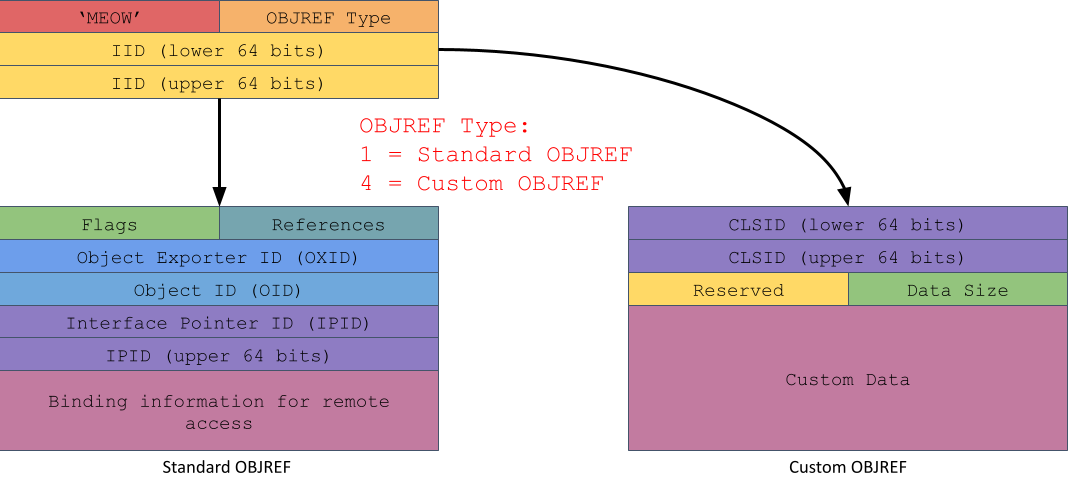
The default COM marshaling strategy is by reference which produces a Standard OBJREF containing all the information needed to connect to the original object. The object might even be on a completely different computer. When the object is unmarshaled this information is used to create an RPC channel back to the caller so that the server can call methods on the object.
The runtime also supports an opt-in marshal by value mechanism if the object implements the IMarshal interface. This allows the object to specify an arbitrary CLSID to use as the unmarshaling object, which doesn’t have to be the same as the object being passed in. When the object is unmarshaled in the server the CLSID is used to lookup an in-process server DLL to load.
Therefore an obvious technique to exploit the dangling COM object registration is to send a Custom OBJREF to a privileged COM service specifying the CLSID of the dangling object. When unmarshaled, which happens automatically in the runtime before the target method is called, the malicious DLL will be loaded and we’d get privilege escalation. The following code shows how trivial it is to specify the dangling COM class in an IMarshal implementation:
class FakeMarshal : public IMarshal {
    // Inherited via IMarshal
    HRESULT GetUnmarshalClass(REFIID riid, void* pv,
                              DWORD dwDestContext, void* pvDestContext,
                              DWORD mshlflags, CLSID* pCid) override
    {
        return CLSIDFromString(L"{E9F83CF2-E0C0-4CA7-AF01-E90C70BEF496}", pCid);
    }
    // ...
};
We need to find a privileged service to send the marshaled COM object to become an administrator. Unfortunately, finding such a service isn’t so simple. The fact that a custom marshaling object will cause an arbitrary DLL to be loaded into the process and code executed is a risky operation, especially across privilege boundaries. Therefore Microsoft implemented a mitigation which can be enabled to disable custom marshaling in the process unless the class is explicitly opted in, or is one of a small number of trusted components such as classes in the runtime library.
Since Windows 8 this mitigation is implemented through two mechanisms, the first and original method is setting the EOAC_NO_CUSTOM_MARSHAL capabilities flag when calling CoInitializeSecurity. The second, added to improve security in AppContainer sandboxes is set through the IGlobalOptions::Set method and specifying the COMGLB_UNMARSHALING_POLICY property type. As we’re not trying to escape from a sandbox the only value of importance is COMGLB_UNMARSHALING_POLICY_STRONG which disables custom marshaling similar to the capabilities flag.
As the dangling COM object isn’t registered as a trusted marshaler this means we need to find a privileged COM server that doesn’t enable these mitigations. The easiest approach is to scan the processes at runtime. The capability flags are stored in the value combase!gCapabilities while the marshaling policy is stored in combase!g_GLBOPT_UnmarshalingPolicy.
However, I kept thinking there must be a COM service that runs as SYSTEM and doesn’t enable custom marshaling. After a bit of fiddling I found one, although there’s no doubt others. It turned out to be a COM service I’ve researched and exploited before, the Shell Create Object Handler object. This is an interesting COM object, in that while it runs in a SYSTEM service, it’s not directly instantiable:
PS> $cls = Get-ComClass -Clsid 135fd325-45b7-4c30-89f8-4386961669f0
PS> $o = New-ComObject -Class $cls
Exception calling "CreateInstanceAsObject" with "3" argument(s): "Class not registered"

PS> $cls.AppIdEntry | Select Name, RunAs, IsService
Name                        RunAs               IsService
----                        -----               ---------
Shell Create Object Handler nt authority\system     False
Normally, when a COM object is hosted by a privileged service, it’s registered with the name of a system service that RPCSS will start automatically when the object class is requested. However, in this case as there’s no service,creating the object fails with a “Class not registered” error. In order to create the COM server, the service needs to already be running as the SYSTEM user before you call CoCreateInstance.
Instead you have to start the privileged server via the \Microsoft\Windows\Shell\CreateObjectTask scheduled task. Fortunately this task can be started by normal users, which you can verify with my Get-AccessibleScheduledTask command:
PS> Get-AccessibleScheduledTask -Executable |
         ? Name -Match Shell\\CreateObjectTask
TokenId  Access                     Name
-------  ------                     ----
77E3156D GenericExecute|GenericRead ...\Shell\CreateObjectTask
Of course just starting this task is not enough, you also need to create a global named event, ShellCreateObjectTaskReadyEvent otherwise the task will immediately exit and not export the COM service. A simple script to create an instance is shown below:
PS> $ev = New-NtEvent -Win32Path "Global\ShellCreateObjectTaskReadyEvent" -InitialState $false
PS> Start-ScheduledTask -TaskPath "\Microsoft\Windows\Shell\" -TaskName "CreateObjectTask"
PS> $ev.Wait()
PS> $o = New-ComObject -Clsid "135fd325-45b7-4c30-89f8-4386961669f0"
PS> $o
InterfaceName Iid
------------- ---
IUnknown      00000000-0000-0000-c000-000000000046
You can verify that the object is hosted in a privileged process with the Get-ComProcess command and checking the CustomMarshalAllowed property. Note this command is currently broken on Windows 11 25H2 due to changing structures that I’ve not had a chance to update, it still works on previous versions.
PS> $objref = Get-ComObjRef -Object $o
PS> $p = Get-ComProcess -ProcessId $objref.ProcessId
PS> $p | Select Name, User, CustomMarshalAllowed
Name    User                CustomMarshalAllowed
----    ----                --------------------
dllhost NT AUTHORITY\SYSTEM                 True
At this point we have everything we need to exploit the dangling COM object, we’ve got a COM service running as SYSTEM with custom marshaling allowed. We can use the CoGetInstanceFromIStorage API to create the object, passing the “fake” marshaled object as the pstg parameter. This object will get marshaled to the COM server process and then unmarshaled unconditionally during object activation. We do need to implement a fake IStorage interface to get it past the local API implementation, which isn’t that difficult but I thought I’d see if there’s an easier way. Let’s look at the supported interfaces:
PS> Get-ComInterface -Object $o

Name                 IID               HasProxy   HasTypeLib
----                 ---               --------   ----------
IUnknown             00000000-0000-... False      False
IMarshal             00000003-0000-... False      False
IMarshal2            000001cf-0000-... False      False
ICreateObject        75121952-e0d0-... True       False

PS> Get-ComInterface -Name ICreateObject | ConvertTo-ComSourceCode -Parse
[
  object,
  uuid(75121952-E0D0-43E5-9380-1D80483ACF72),
]
interface ICreateObject : IUnknown {
    HRESULT Proc3([in] GUID* p0, [in] IUnknown* p1,
                  [in] GUID* p2, [out, iid_is(p2)] IUnknown** p3);
}
The COM object only has one unique interface, ICreateObject. Converting the interface proxy to IDL shows that it takes an IUnknown pointer as its second parameter. Therefore to exploit the dangling COM registration we can just pass the “fake” marshaled object to this parameter and get privileged code execution. I’ve attached an updated, fully working exploit of the bug to the original issue here.
It’s worth noting that while this exploitation technique makes it easy to exploit dangling COM registrations, it can also be used to exploit buggy COM class custom unmarshalers. Sometimes, just the act of loading a DLL into a process can cause a crash.
Finding the Original Dangling COM Object Registration
As a footnote, a quick way to try and find other dangling COM servers would be to use the following PowerShell script with my OleViewDotNet and NtObjectManager modules installed:
function Test-ComServer {
    param($Server)
    try {
        Use-NtObject($lib = Import-Win32Module -Path $Server -Flags AsDataFile) {
            $true
        }
    } catch {
        $false
    }
}

PS> $db = Get-ComDatabase -LoadMode MachineOnly
PS> $cs = Get-ComClass -Database $db -ServerType InProcServer32
PS> $cs | ? { -not (Test-ComServer $_.DefaultServer) } |
        Sort DefaultServer | Select Name, DefaultServer
This will print out any in-process COM class from the machine hive where LoadLibrary can’t find the DLL. It’s important to use LoadLibrary via the Import-Win32Module command as some of the COM registrations only specify the file name and you want to ensure these are resolved correctly according to the system path.
This script will find the dangling CrossDevice COM class on an unpatched system. Note, you’ll need to manually inspect the paths to see if a DLL can be planted at that location. You could make it smarter by checking if the path is in a directory that can be written to, or even test if an existing DLL can be modified, but that’s an exercise for the reader.